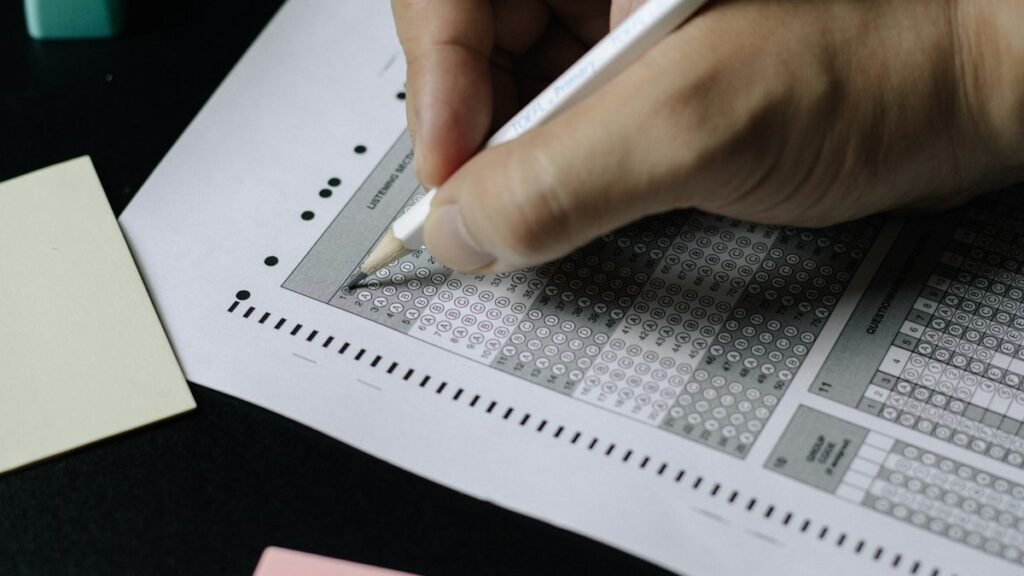
How to fill an OMR sheet correctly: Read the instructions printed on your answer sheet first, enter your roll number and booklet code in the specified boxes, use only the pen or pencil permitted for your examination, and darken the single correct bubble fully against the matching question number. Most OMR errors happen when candidates use the wrong marking instrument, fill the wrong row, leave identity fields incomplete or try to erase a marked answer.
Important: OMR rules are not identical across every examination. The examination authority’s instructions on the sheet, admit card and official notice take priority over any general guide. A pen colour, correction method or signature requirement used in one examination must not automatically be applied to another.
What Is an OMR Sheet?
OMR means Optical Mark Recognition. An OMR answer sheet is scanned by a machine that detects marks in printed response areas. The scanner does not interpret what a candidate intended to mark; it reads the position and appearance of the recorded mark. That is why a correctly chosen answer can still be recorded incorrectly if the candidate fills the wrong bubble or marks outside the designated area.
OMR sheets are used in several offline objective examinations. For example, the UPSSSC PET exam pattern specifies an offline OMR-based test, and the MPSC Group C preliminary examination is also scheduled in offline OMR mode. The AILET 2027 law entrance examination is also conducted offline using an OMR sheet.
Before You Start Filling the OMR Sheet
- Wait for the invigilator’s instruction. Do not begin filling answer bubbles before the examination is formally started or before the permitted time.
- Read the complete printed instructions. Check the permitted pen or pencil, whether bubbles must be fully darkened, how corrections are handled and which fields require a signature or time.
- Inspect the sheet. If it is torn, badly printed, smudged or has a mismatch in its booklet code, raise your hand and report it before marking answers.
- Keep your admit card and question booklet ready. You may need to copy your roll number, test booklet number, subject code or question-paper series exactly as printed.
- Identify the no-writing areas. Some sheets contain registration marks or machine-reading areas where no writing or stray marks are permitted.
How to Fill an OMR Sheet Step by Step
Step 1: Fill in your personal and examination details
Enter the required information in the boxes provided. Depending on the examination, these may include your roll number, application or registration number, test booklet number, question-paper series, subject code, centre code, name, signature or date. Use the exact format requested on the sheet.
If the form has both a written-number box and a bubble grid, complete both. Copy each digit carefully and shade the bubble in the corresponding column. Do not leave leading zeroes out if they are printed as part of the required number.
Step 2: Match the question-paper or booklet code
Check the code printed on the question booklet against the code field on the OMR sheet. If the two do not match, inform the invigilator immediately. Do not guess the correct code or copy a code from another candidate.
Step 3: Use only the permitted marking instrument
There is no universal pen-colour rule for every OMR examination. Some instructions specify black ink or black ballpoint pen; others may permit blue or black ballpoint pens or a particular pencil. Use exactly what your examination authority permits. Do not assume that a pen accepted in a school test will also be accepted in a national or state recruitment examination.
For example, the UPSC CAPF 2025 notification requires a black ballpoint pen for both writing and marking the OMR sheet and warns that mistakes in the roll number or test-booklet series code can make the answer sheet liable for rejection. The NTA’s 2021 NEET OMR instruction PDF also illustrates exam-specific marking and anti-tampering rules. These are examples for those examinations, not universal rules for every test.
Step 4: Darken the selected bubble fully
- Mark the bubble corresponding to the answer you selected.
- Fill the bubble neatly and completely, as instructed.
- Do not use a tick, cross, slash or small dot where a fully shaded bubble is required.
- Do not shade two options for one question unless the examination explicitly permits multiple responses.
- Keep the mark within the printed response area and avoid touching nearby bubbles.
Step 5: Match every answer with the correct question number
Check the question number printed beside the bubble row before marking. If you skip Question 18 and return to it later, make sure you do not accidentally enter its answer in the row for Question 19. A one-row shift can affect every response that follows. Use the question paper and OMR sheet side by side and keep your place with a finger or a clean marker on the question paper, not on the OMR sheet.
Step 6: Follow the official correction procedure if you make a mistake
Do not use whitener, an eraser, a blade or repeated scratching unless the examination authority explicitly permits a particular correction method. Some OMR instructions prohibit tampering altogether. If you make an accidental mark or notice an error in an identity field, stop and ask the invigilator what the official procedure allows. Do not assume that a replacement sheet will be issued.
Step 7: Complete the declaration and signature fields
Some examinations require a candidate signature, time of signing, thumb impression or declaration in a specified box. Complete only the fields requested and use the handwriting or signature format mentioned in the instructions. Do not sign in a space reserved for the invigilator.
Common OMR Sheet Filling Mistakes to Avoid
| Mistake | Why it matters | What to do instead |
|---|---|---|
| Wrong roll number or digits | The response sheet may not be matched correctly to the candidate. | Copy each digit from the admit card and check the written number against the bubbled number. |
| Wrong booklet or question-paper code | Responses may be checked against the wrong paper series. | Match the code on the booklet and answer sheet before answering. |
| Half-filled or lightly marked bubble | The scanner may not read the response as intended. | Fill the bubble completely in the manner shown on the sheet. |
| Two bubbles for one question | The response may be treated as invalid or incorrect under the exam rules. | Mark only one option unless multiple responses are expressly allowed. |
| Wrong question-number row | Later answers can become misaligned. | Check the question number before every mark, especially after skipping a question. |
| Using an unapproved pen or pencil | The mark may not meet the scanning or examination requirements. | Follow the exact instrument specified by the authority. |
| Whitener, erasing or scratching | Corrections may damage the sheet or be treated as tampering. | Ask the invigilator and follow the authorised correction procedure. |
| Stray marks, folds or rough work | Extra marks or physical damage may interfere with scanning. | Keep the sheet flat and write only in the designated fields. |
Should You Fill the OMR Sheet Question by Question or in Batches?
The safest approach depends on your accuracy and the instructions of the examination. Some candidates mark an answer immediately after solving each question. Others record answers on the question paper and transfer them in small batches, such as every five or ten questions. Either method can work if the candidate consistently checks the question number and has enough time to transfer every response.
Avoid leaving the entire OMR sheet until the final minutes. Keep a few minutes at the end to verify the roll number, booklet code, response rows and required signature fields. Do not rush the final transfer or change a marked bubble without following the official procedure.
Final OMR Sheet Checklist Before Submission
- Roll number and other candidate details are complete and match the admit card.
- Question-paper or booklet code matches the booklet supplied.
- Every answer is marked against the correct question number.
- Each response has only the permitted number of bubbles marked.
- All required declaration, signature and time fields are complete.
- No unauthorised writing, rough work, whitener or stray marks have been added.
- The sheet is not folded, torn or damaged.
When the invigilator asks for the answer sheet, submit it as instructed. Do not remove the original OMR sheet from the examination hall unless the authority expressly permits it.
Frequently Asked Questions
Which pen should I use to fill an OMR sheet?
Use the exact pen or pencil specified in your examination instructions. The rule can differ by exam. Do not assume that black or blue ink is universally accepted.
Can I use a pencil to fill OMR bubbles?
Only if the examination authority expressly permits it. If the instructions specify a ballpoint pen, do not use a pencil.
What happens if I fill two bubbles for one question?
In most single-answer objective tests, more than one marked option is treated as an invalid or incorrect response. Check the marking rules for your examination.
Can I erase or correct an answer on an OMR sheet?
Do not erase, scratch or use whitener unless the official instructions specifically allow a correction method. Ask the invigilator if you make a mistake.
What should I do if the booklet code on my OMR sheet is different?
Inform the invigilator immediately before marking answers. The invigilator can confirm the official procedure or arrange a replacement if permitted.
Can I do rough work on the OMR sheet?
No, unless a specific area is expressly provided for that purpose. Use the question booklet or the rough-work space authorised by the examination authority.
Should I fill all OMR answers at the end?
Do not leave all responses for the final minutes. Fill answers question by question or in small batches, whichever helps you avoid row errors, and reserve time for a final check.
Last updated: 10 November 2026. This is a general candidate guide. The latest official instructions printed on your own OMR sheet, admit card and examination notice always take priority.